pritha's Posts (627)

Sort by

Top 5 Vendors in Email Security Market at RSAC 2017

RSA conference is one of the leading security conference worldwide.  It creates a tremendous opportunity for vendors, users and practitioners to innovate, educate and discuss around the current security landscape.

Email security gateways prevent malware, phishing attacks, spam and other unwanted emails from reaching their recipients and compromising their devices, user credentials or sensitive data. Email security refers to the collective measures used to secure the access and content of an email account or service. It allows an organization to protect the overall access to one or more email addresses/accounts.


Here are the top 5 vendors to watch out for in Email security market:


Proofpoint

Proofpoint Email Protection stops malware and non-malware threats such as impostor email (also known as business email compromise, or BEC). Deployed as a cloud service or on-premises, it provides granular filtering to control bulk “graymail” and other unwanted email and business continuity capabilities keep email communications flowing, even when organizations email server fails.

To Know More: Visit Proofpoint Email Protection Product Page


Cisco

Cisco Email Security protects against ransomware, business email compromise, spoofing, and phishing. It uses advanced threat intelligence and a multilayered approach to protect inbound messages and sensitive outbound data.

To Know More: Visit Cisco Email Security Appliance Product Page


(Read More: Secure your Gmail , Hotmail & Dropbox with 2-Factor Authentication)


Microsoft

Microsoft Exchange Online Protection provides a layer of protection features that are deployed across a global network of datacenters, helping organizations simplify the administration of their messaging environments. Another Microsoft product for exchange “Office 365 Advanced Threat Protection you can protect against unsafe attachments and expanding protection against malicious links, it complements the security features of Exchange Online Protection to provide better zero-day protection.

To Know More: Visit Microsoft® Forefront® Online Protection for Exchange Product Page


Symantec

Symantec™ Email Security.cloud filters unwanted messages and protects users from targeted attacks. The service has selflearning capabilities and Symantec intelligence to deliver highly effective and accurate email security. Encryption and data loss prevention help you control sensitive data. It supports Microsoft Office 365, Google Apps, on premises or hosted Microsoft Exchange, and other mailbox services, delivering always-on, inbound and outbound messaging security.

To Know More: Visit Symantec™ Email Security.cloud Product Page


(Read More: 50 EMERGING IT SECURITY VENDORS TO LOOK OUT FOR IN 2017)


Mimecast

Mimecast Secure Email Gateway uses multi-layered detection engines and intelligence to protect email data and employees from malware, spam, phishing, and targeted attacks. Mimecast email security appliance is deployed in cloud.

To Know More: Visit Mimecast Secure Email Gateway Product Page


For more info on Email Security market, please visit: Email Security Gateways Market Page

Read more…

From our experience of helping organisations in building their ‘Vulnerability Management’ program, we feel that one of the major challenge the security manager/management faces does not always know the reality on the grounds. Obviously, the management is extremely busy and has got too many priorities. It is natural to get into managing whirlwinds. So, I wanted to define a few questions which can help you to find out how robust is your application security management program and also for assessing vulnerability management program better. Not just that, by asking the questions you will also be able to formulate your vulnerability management strategy better.


( Read More: Top 6 Reasons Why Data Loss Prevention (DLP) Implementation Fails )


Vulnerability Management Program – Key Questions to assess the maturity of your application:

Goal Setting, Measurement, Team

  1. Do you have clearly defined and measurable application security program goals which can be understood across your team?
  2. Do you have a set of measures to assess if the application security program has failed or succeeded? (Lead Measures)
  3. Do you have a set of measures that can predict whether your program goals will be met in future? (Lag Measures)
  4. Does your team have a weekly/real time dashboard to know how well they are performing without being reviewed by their manager?
  5. Do you know the team’s capacity of testing? Is there a gap between the need and the capacity? Are you measuring the output vs capacity?
  6. Do you have a single owner for managing the Application Security Program?

Knowing your Key Metrics

  1. Do you know how many applications you have, their owners and business criticality?
  2. Do you know how many critical vulnerabilities are open i.e yet to fixed?
  3. Do you know the average fixing time?
  4. Do you know the cost per test? (all inclusive i.e. Salary, hardware, software, Management cost)
  5. Do you have enough people to test and remediate?


Quality

  1. Have you tested for business logic flaws? What’s the “False Negative Rate”?
  2. Are similar vulnerabilities being repeated again and again?
  3. Did you build an integrated application security program?  i.e Vulnerability Management, Fixing, Training, SIEM, WAF etc are integrated in a seamless manner.

( Read More: 8 Questions To Ask Your Application Security Testing Provider! )

Read more…

How to benchmark a web application security scanner?

There is a plethora of web application scanner; every one of which claims to be better than the other. It is indeed a challenge to differentiate between them. We need to benchmark the application scanner against hard facts and not marketing claims. Below are some of the most critical metrics against which you would like to benchmark web application scanner.


1. What is the rate of false positives?

False Positives are vulnerabilities reported by a tool that don’t actually exist.  Any web application scanner will throw some false positives.  First we need to understand how false positives are harmful. Even though  they don’t apparently seem to be harmful; it costs money to remove them. Imagine a little bit of sand in your food. You can’t eat that food; similarly you can’t send a report with false positives to developers.


Removing false positives from web application scanner reports takes a lot of time. Hence it adds to your man-power cost and of course the drudgery of doing boring work. I have seen so many organization losing people because the work becomes monotonous.


So, you need to check the percentage of false positives reported by the web application scanner. The flip side however is that a web application scanner can minimize its percentage of false positives by limiting its coverage which leads to the next question.


( Read More: Identity & Access Management (Workshop Presentation )


2. How many classes (or percentage) of vulnerabilities does it cover?

False negatives or vulnerabilities missed out is another critical element. You need to understand the percentage coverage of the web application scanner to ensure that critical vulnerabilities are not missed (particularly at the expense of not having to report false positives). You can use WASC 1, WASC 2 or OWASP as a guideline for what should be covered.


3. Which are the classes web application scanner does not cover?

If a web application scanner does not cover certain classes of test (which is always the case), you should know: which are those classes? How important are the classes of test for your business? Can you live without them?


4. How good is the coverage of the crawler? Is there any benchmark?

Crawlers are the fundamental part of any web application scanner. The first step of any testing is crawling. If a page is not crawled then it is not tested. You can benchmark different web application scanner against the number or the percentage of the pages it could crawl. Fast scanning does not mean good scanning. You need a web application scanner which can comprehensively crawl all the pages.


5. How many scans can run in parallel?

Most organizations today have multiple web applications which need to be tested frequently.  You need aweb application scanner which can scan multiple tests in parallel. Don’t go by the number stated on the product datasheet but how many it can actually run in parallel without significant degradation of performance. So the best thing is to try it and check this out yourself.


( Read More: CISO Platform Top IT Security Influencers (Part 1) )


6. How Flexible are the configuration options of the tool?

Does the tool give you the ability to fine tune what test classes it scans for and let you test your production environment safely? Options that allow you to prevent things like automatic form filling, or limiting the number of concurrent threads etc. can prevent unnecessary disruption to your organization when testing your production environment with a tool.

Few more suggestions by readers and community members


Credits: Simon Bennetts, James McGovern, Keighley Peters

  • How long does it take to run? (Quicker means it could be less comprehensive test. Check for number of tests/hour etc)
  • How long does it take to learn and configure to work effectively?
  • How much does it cost?
  • What are the licensing terms?
  • How many organizations use the tool? How satisfied are they?
  • Are there any industry recognition/analysts mentions (e.g. Gartner)?

The selection of appropriate scanner can be very challenging as every organization has developed their applications differently. By considering the metrics discussed above, organizations can benchmark their application scanner to evaluate the effectiveness of a scanner and make a right choice for their organization.

Read more…

Here is the list of my top 10 blogs on DLP solution, which you should go through if you are in-charge of creating, implementing and managing DLP program in your organisation.


1. A business case for Data loss prevention:

A good small write up giving out some of the tips for building a business case for DLP in terms of some of the immediate benefits that it brings to the organisation, such as data security and compliance obligations.


2. Building a business case for DLP tools:

A comprehensive article and guide to help you build a business case for DLP solution.


3. Positioning DLP for executive buy-in:

A blog from Digital Guardian, one of the leading vendors in DLP market, talks about how to build allies and properly position DLP to decision makers. This Blog is a part of more comprehensive guide ” The definitive guide to DLP”


4. Tips for creating a data Classification policy:

A good data classification policy is perhaps the most important pre-requisites for a successful DLP program in any organisation. This Blog from TechTarget gives out some of the tips for a workable data classification policy.


5. Key considerations in protecting sensitive data leakage using DLP tools:

This article from ISACA highlights 10 key considerations that could help organisations plan, implement, enforce and manage DLP solutions. This article also gives a good overview of DLP solution in general


6. 5 tips to evaluate your readiness before implementing DLP solution:

This Blog from CISO platform lists out the five questions to ask yourself to assess your organisational readiness for implementing DLP solution. You should take care of these 5 things before you go ahead with your DLP project.


7. 7 Strategies for a successful DLP deployment:

This blog from CSOonline lists out a set of strategies to help you see through a successful DLP implementation. Though it’s obvious people often miss out on these.


8. How to evaluate DLP solutions: 6 steps to follow and 10 questions to ask:

Choosing the right DLP solution for your company can be overwhelming; in order to make an educated buying decision, each vendor must be properly evaluated for its strengths and weaknesses.


9. Top 6 reasons why DLP implementations fail:

Another blog from CISO Platform lists out some of the top reasons why a DLP implementation may fail or may not achieve the stated company objectives.


10. An Expert Guide to Securing Sensitive Data: 34 Experts Reveal the Biggest Mistakes Companies Make with Data Security:

Digital guarding has some of the good resources on DLPsolution. This blog elicits insights from some of the data security experts on top mistakes one can make while approaching a data security problem in organisations.

Read more…

Bug bounty programs are quite common these days with several of the biggest names in the industry have launched various avatars of the program. I have been asked by a few security managers and managements about should they launch a bug bounty program. Definitely bug bounty program has the advantage of crowd sourcing. However an organization should be mature and prepared enough to launch such a program. Here are some questions which shall tell you if you are prepared or not. You are ready only if all the answers to the questions are “Yes”.


( Read More: 16 Application Security Trends That You Can’t Ignore In 2016 )


You are ready if you can say “Yes” to all of the following:


1. Have you conducted a deep penetration testing exercise before?

Bug bounty should be adopted not as the first step but as one of the last few steps in your application security testing. If you are not secure enough and have not done the home work, it will just open an ugly face you do not want to show. Also this will expose you to unnecessary risks apart from losing a lot of money since there will be too many vulnerabilities for which you will have to pay.


2. Do you regularly conduct security testing for your apps?

Do you test your app during every release? If not your organization maturity in terms of application security testing is not enough to expose yourself to the hackers (both blackhat and whitehat) around the world.


3. Do you have an application security management program in place?

You should ideally have a define application security management program in place. How do you test, remediate, manage and respond to vulnerabilities? Is it adhoc? Do you have a written process? Do you have an organization structure with right team, defined KRA/KPIs and management process in relation to Application Security Management?


4. Do you have capacity to fix vulnerabilities very fast?

It is bad situation to have a vulnerability reported to you but you are not able to close it fast enough. There will be several persons who will report the same vulnerability and you might have the policy to pay the one who does it first. So if your closing time is not fast enough, you have the risk of denying “bounty” to more number of persons and hence creating more number of dissatisfied souls.


5. Does bug bounty program affect any of your customer SLAs?

Do make sure to check your customer SLAs before you expose yourself to bug bounty. Do you have a multi-tenant system? What are the bindings and the rights which are there with you or your customers? What are the SLAs and terms you have with your internal customers?

( Read More: 9 Top Features To Look For In Next Generation Firewall (NGFW) )

6. Does Bounty affect your organizations Risk Management Program?

You need to check with your Chief Risk Officer or CFO or whoever who manages the Risk Management Program. Bug bounty shall definitely have implications on your organizational risk and hence it should be routed through the proper channel to measure the acceptance of the risk.


7. Did you calculate your financial ROI metrics?

You should calculate the financial ROI before you jump in. How many vulnerabilities do you expect to be discovered? What is the amount of money you need to pay? What will be the cost of discovering the same vulnerabilities using other models like internal testing or testing through a known vendor? Does it make financial sense to launch such a program? If yes, what should be the right payout for each vulnerability?


8. Did you create a detailed document on the program, policies and procedures? Do you have an exit strategy?

Make sure that you create a detailed written document of the program, policies and procedures. Please get it vetted by a few pair of extra eyes. It is even better to get some feedback from somebody who did it before. Suppose the program does not work, do you have a failover and exit strategy?


9. Do you a single owner for the program and organizational support structure?

You should ideally have a single owner with the right set of KRAs and KPIs defined for him/her. Also, make sure that the person is provided with the right amount of organization support to make the program successful.


10. Do you have enough marketing reach/support to make the bug bounty successful?

Bug bounty will be successful if you have the reach and access to the right set of audience. Have you identified the channels for reach out/ marketing? You need to have a sustained program to make it work.


Bug bounty can work if executed right. If your organization is not geared up for bug bounty you can definitely work with the more traditional means like using various solutions from consultants, in-house teams or even the emerging cloud based testing solutions.


Read more…

Over the last few years, our On-Demand and Hybrid Penetration Testing platform has performed security testing of applications across various verticals and domains including Banking, e-commerce, Manufacturing, Enterprise Applications, Gaming and so on. On one side, SQL Injection, XSS and CSRF vulnerabilities are still the top classes of vulnerabilities found by our automated scanning system, on the other hand however, there are a lot of business logic vulnerabilities that are often found by our security experts powered by a comprehensive knowledge base. Here we will discuss top business logic vulnerabilities in Banking Applications.


Business logic vulnerabilities are defined as security weaknesses or bugs in the functional or design aspect of the application. Because the security weakness or bug is in the function or design, it is often missed by all existing automated web application scanners.


In this blog we are sharing the top commonly found Business Logic Vulnerabilities in the Virtual Credit Creation (VCC) module of a Banking Application. 

Consider the following scenario: A Banking Application provides web based functionality to users to pay Bills Online as well as to create and manage Virtual Credit Cards. Virtual Credit cards are used to shop online. A Virtual Credit Card creation use case involves the following steps:

1. User visits banking application.
2. User opts to create virtual credit card.
3. User fills up personal details, required amount, expiry date of VCC etc.
4. User chooses a payment gateway.
5. User fills up credit / debit card details.
6. Banking Application redirects user to a Payment Gateway.
7. Required amount + Service Charge are debited from user’s Debit / Credit card.
8. Payment Gateway redirects user to a Callback URL provided by the Banking Application.
9. Banking Application verifies the Payment Gateway confirmation.
10. Banking Application generates a CVV number.
11. Banking Application presents VCC details to the user.
12. Banking application performs SMS verification of the user.


A couple of security weaknesses that are found in the above scenario are as follows:

(Read more:  Technology/Solution Guide for Single Sign-On)

TAMPERING OF DATA COMMUNICATION BETWEEN PAYMENT GATEWAY AND BANKING APPLICATION:

Weaknesses: The Banking application does not verify whether the required amount is successfully paid at the Payment Gateway Side, or what amount is being paid at the Payment Gateway Side. As a result, a virtual card can be recharged with higher amount while paying a lower amount to the bank by modifying amount when the request is sent from payment gateway to the bank.


Mitigation:
 There should be sufficient validations between the Banking application and the payment gateway. The callback URL should not be allowed to be directly controlled by an attacker
Tweet This!


NO VALIDATION ON BANKING APPLICATION’S CALLBACK URL

Weakness: There is lack of validation on the Banking Application Side when the Payment Gateway redirects a user to the Banking Application’s callback URL. As a result, a virtual credit card can be created without paying any service charges, by sending the request directly to the callback URL of Payment Gateway.


Mitigation:
 There should be enough validations on the callback URL including whether the URL is redirected by the Payment Gateway or directly called by an attacker-
Tweet This!


VIRTUAL CREDIT NUMBER IS PREDICTABLE

Weakness: Generated Virtual Credit card numbers are predictable or follow certain patterns. As a result, an attacker can predict what virtual credit card numbers are being used by other legitimate users.


Mitigation:
 Virtual Credit Card numbers should be sufficiently random-
Tweet This!

NO ANTI-AUTOMATION IN VIRTUAL CREDIT CARD DETAILS VERIFICATION

Weakness: There is no anti-automation (e.g. CAPTCHA) while verifying the Virtual Credit Card details such as CVV number and expiry date. The Credit Card number is sufficiently long however, the CVV number is generally a 3 digit number and expiry date is also a 2 digit number. As a result, it is possible to brute force the CVV number and expiry date, and shop online using a stolen virtual credit card number.


Mitigation:
 There should be sufficient anti-automation e.g. CAPTCHA while verifying the CVV numbers along with the Credit Card Number-
Tweet This!


NO ANTI-AUTOMATION IN CARD CREATION PROCESS

Weakness: There is no anti-automation while creating a virtual credit card. An attacker can use automated scripts to exhaust credit card numbers. As a result, Credit Card Numbers can be exhausted and be therefore made unavailable to users leading to a Denial of Service (DoS) attack. It can also lead to other attacks including Credit Card Number pattern prediction.


Mitigation:
 There should be sufficient anti-automation e.g. CAPTCHA while creating virtual credit card numbers-
Tweet This!


Adapted from the original post written in Iviz Security Website.


(Read more: CISO Guide for Denial-of-Service (DoS) Security)

Read more…

Top 5 Application Security Technology Trends

Following are the top 5 Application Security Technology Trends:

1.    Run Time Application Security Protection (RASP)

Today applications mostly rely on external protection like IPS (Intrusion Prevention Systems), WAF (Web Application Firewall)etc and there is a great scope for a lot of these security features being built into the application so that it can protect itself during run time.

RASP is an integral part of an application run time environment and can be implemented as an extension of the Java debugger interface. RASP can detect an attempt to write high volume data in the application run time memory or detect unauthorized database access. It has real time capability to take actions like terminate sessions, raise alerts etc. WAF and RASP can work together in a complimentary way. WAF can detect potential attacks and RASP can actually verify it by studying the actual responses in the internal applications.

Once RASP is inbuilt in the applications itself, it would be more powerful than external devices which have only limited information of how the internal processes of the application work.


(Read more:  Top 5 Big Data Vulnerability Classes)


2.   
 Collaborative Security Intelligence

By collaborative security, I mean collaboration or integration between different Application Security technologies.


DAST+SAST: DAST (Dynamic Application Security Testing) does not need access to the code and is easy to adopt. SAST (Static Application Security Testing) on the other hand needs access to the code but has the advantage of having more insights of your application’s internal logic. Both the technologies have their own pros and cons, however, there is great merit in the ability to connect and correlate the results of both SAST and DAST. This can not only reduce false positives but also increases the efficiency in terms of finding more vulnerability.


SAST+DAST+WAF: The vulnerabilities detected by the SAST or DAST technologies can be provided as input to WAF. The vulnerability information is used to create specific rule sets so that WAF can stop those attacks even before the fixes are implemented.


SAST+DAST+SIM/SIEM: The SAST/DAST vulnerability information can be very valuable for SIM (Security Incident Management) or SIEM (Security Incident Event Management) Correlation engines. The vulnerability information can help in providing more accurate correlation and attack detection.


WAF+RASP: WAF and RASP are complementary. WAF can provide information which can be validated by RASP and hence help in more accurate detection and prevention of attacks.


Grand Unification: Finally one day we will have all the above combined together (and many more) in such a way so that organization can have true security intelligence.


(Read more:  5 easy ways to build your personal brand !)


3.    Hybrid Application Security Testing

By “Hybrid” I mean combining automation and manual testing in a manner “beyond what consultants do” so that we can achieve higher scalability, predictability and cost effectiveness.

READ MORE >>  5 Key Benefits of Source Code Analysis

DAST and SAST both have their own limitations. Two of the major problems areas are False Positives and Business Logic Testing. Unlike Network Testing where you need to find known vulnerabilities in a known piece of code, Application Testing deals with unknown code. This makes the model of vulnerability detection quite different and more difficult to automate. So you get the best quality results from consultants or your in-house security experts. However, this model is non-scalable. There are more than a Billion applications which need testing and we do not have enough humans on earth to test them.


It is not a question of “man vs. machine” but it is a matter of “man and machine”. The future is in the combination of automation and manual validation in “smart ways”. iViZ is an interesting example that uses the automated technology along with “work flow automation” (for manual checks) so that they can assure Zero False Positives and Business Logic Testing with 100% WASC Class coverage. In fact they offer unlimited applications security testing at a fixed flat fee while operating at a gross margin better than average SaaS players.


(Read more: Phishers Target Social Media, Are you the Victim?)


4.    Application Security as a Service

I believe in “as a Service” model for a very simple reason: We do not need technology for the sake of technology but to solve a problem i.e. it’s the solution/service that we need. With the growing focus on “Core Competency”, it makes more sense to procure services than acquire products. “Get it done” makes more sense than “Do It Yourself” (off course there are exceptions).


Today we have SAST as a Service, DAST as a Service, and WAF as a Service. Virtually everything is available as a service. Gartner, in fact has created a separate hype cycle for “Application Security as a Service”.


Application Security as a Service has several benefits like: reduction of fixed operational costs, help in focusing on core competency, resolving the problems of talent acquisition and retention, reduction of operational management overheads and many more.


(Watch more : 3 causes of stress which we are unaware of !)


5.    Beyond Secure SDLC: Integrating Development and Operations in a secure thread

Today is the time to look beyond Secure SDLC (Software Development Life Cycle). There was a time we saw a huge drive to integrate security with the SDLC and I believe the industry has made some decent progress. The future is to do the same in terms of “Security+Development+Operations”. The entire thread of Design, Development, Testing through to the Production, Management, Maintenance and Operations should be tied seamlessly with security as the major focus. Today there is a “security divide” between Development and Operations. This divide will blur some day with a more integrated view of security life cycle.


Adapted from the original blog written in Iviz Security Website.


Read more…

Application Security has emerged over years both as a market as well as a technology. Some of the key drivers had been the explosion in the number of applications (web and mobile), attacks moving to the application layer and the compliance needs.

Following are 16 Application Security Trends which we believe the industry will observe in 2016.


1. Beyond Tools – Build Application Security Program

As an industry mature organizations shall look at Application Security not as technology and tool problem but as a Holistic Program. BSIMM lists out more than 100 elements of application security program that is observed in more in 78 participating organization.


2. Hacking of Everything shall be on rise: Internet Of Things (IOT), Cars, Air Planes and more

With more of adoption of Internet Of Things (IOT) and not so secure practices by the startups, we will see a surge of Internet Of Things (IOT) devices getting hacked. Now your camera, light bulb, refrigerator, car or anything that is connected shall be hacked.


( Read More: 8 Questions To Ask Your Application Security Testing Provider! )


3. Security Testing for Continuous Integration and Continuous Deployment (CI/CD)

More and more organizations shall integrate security testing for Continuous Integration (CI) Or Continuous Deployment (CD). Scanning tools shall gradually evolve and mature to support CI/CD


4. Emergence of Run Time Application Self Protection (RASP), Interactive Application Security Testing (IAST) and Real Time Polymorphism tools

RASP (Run Time Application Self Protection) and IAST (Interactive Application Security Testing) is being aggressively promoted by vendors. This year shall be more of the year of awareness with potential mainstream adoption being at least 2 years away. Both RASP and IAST has it’s strengths and weakness and time will say whether they will win. Real Time Polymorphism has the potential but has slow adoption until now.


5. Third Party Vendor Risk Management shall become more important

Increasingly more number of organizations will ask for Penetration Testing report for applications developed by third party to manege Vendor Risks. Acceptance criteria shall not just have the functional but also the security aspects.


( Read More: 5 Questions You Want Answered Before Implementing Enterprise Mobili… )


6. Higher due diligence before adopting new cloud solution

Most of the larger enterprises shall ask for third party pen test report or more thorough due diligence before they adopt a cloud solution. Especially the newer Software As A service (SaaS) or Cloud solution providers have to provide pen test report as a part of the sales process.


7. Dynamic Application Security Testing (DAST) will remain the most popular form of testing with Static Application Security Testing (SAST) playing the catch up game

DAST (Dynamic Application Security Testing) had been the primary mode of application security testing and will continue to be so. It is the easiest to adopt and gives exactly the perspective of an external attacker who will not have access to your code. For Web based Applications there is resistance towards providing binaries or the code. However for mobile apps organizations are more willing to provide the binary for the client side application. This shall be one of the drivers for higher adoption of SAST (Static Application Security Testing).


8. Customers will ask for a combination of Static Application Security Testing (SAST)& Dynamic Application Security Testing (DAST)especially for Mobile Apps

Though organizations understand the importance of combining SAST and DAST, it is the mobile App testing which shall drive higher adoption for this. More security sensitive organizations at a higher maturity level shall conduct SAST and DAST together. DAST will continue to be the first most important type of testing.


9. Large organizations will scan more than 80% of their portfolio applications at least once a year

Large organizations with more than 100 apps will strive to test more than 80% of their applications at least once a year. Testing all the apps shall be one of the priorities of the Chief Information Security Officers (CISO).


( Read More: 9 Top Features To Look For In Next Generation Firewall (NGFW)


10. Application hacking incidents shall rise with the need for mature response program

Last year had been the year of hacks for big companies. 2016 shall be no different. Apart from detection and prevention, the industry shall need mature breach response program. No matter what you do – Hack happens.


 11. Jobs for Application Security will be more than ever before and would continue to grow

The industry has a severe shortage in terms of the number of application security testers. There are the higher number of jobs than the available eligible professionals. Few of the major trends in terms of ethical hacking as professions is available in this blog- Click Here


12. Majority of Large organizations shall outsource their Application Security Testing

Large organizations shall not be able to manage application security testing due to shortage of available talents and management overhead. Most of the large organizations shall outsource application security testing as a continuous program.


13. Organizations will move toward continuous/regular vulnerability management program

Organizations have understood that one time or sporadic testing is not enough. The industry has understood the importance of continuous or regular testing and the criticality to adopt it as a management program.


14. Integration of Vulnerability management program with Security Information & Event Management (SIEM) Or Web Application Firewall (WAF)

The industry shall see higher number of integration of vulnerability management program and the preventive solutions like Security Information & Event Management (SIEM) Or Web Application Firewall (WAF). This shall become one of the criteria of choosing the vendors for security testing.


( Watch More: Webinar on “Defusing Cyber Threats Using Malware Intelligence” )

15. Difficult to detect but more dangerous Logical Vulnerabilities

The importance of Logical Vulnerabilities in application security testing is one of the less spoken topics by the security testing product vendors. Most of the security testing products or cloud solutions are unable to cover this. Logical vulnerabilities are the most critical and difficult to detect. The mature organizations shall ask for Business Logic testing as a mandatory requirement.


16. Changing the habit of coders

Just awareness is not enough. Think of the number of us who know about the importance of exercise but how many can do it. We need habit forming tools and products to embed secure coding behavior right at the time somebody types out a function. Testing is too late to enter the game.

READ MORE >>  How to benchmark a web application security scanner?

Read more…

5 Key Benefits of Source Code Analysis

Static Code Analysis: Binary vs. Source

Static Code Analysis is the technique of automatically analyzing the application’s source and binary code to find security vulnerabilities. According to Gartner’s 2011 Magic Quadrant for Static Application Security Testing (SAST), “SAST should be considered a mandatory requirement for all IT organizations that develop or procure application”. In fact, in recent years we have seen a shift in application security, whereas code analysis has become a standard method of introducing secure software development and gauging inherent software risk.


Two categories exist in this realm:

1. Binary – or byte- code analysis (BCA). Analyzes the binary/ byte code that is created by the compiler.

2. Source code analysis (SCA). Analyzes the actual source code of the program without the requirement of retrieving all code for a compilation.

Both offerings promise to deliver security and the requirement of incorporating security into the software development lifecycle (SDLC). Faced with the BCA vs SCA dilemma, which should you choose?


(Read more: Checklist to Evaluate A Cloud Based WAF Vendor)


The Inherent Flaws of Binary Code Analysis (BCA)

On the one hand, BCA saves some of the code analysis efforts since the compiler automates parts of the work such as resolving code symbols. Ironically, however, it is precisely this compiler off-loading which presents the fundamental flaw with BCA. In order to use BCA, all code must be compiled before it is scanned. This raises a plethora of problems that push back the SDLC process and gives security a bad, nagging name.

Issues include:

  • Vulnerabilities exposed too late in the game. Since all the code must be compiled prior to the scan, security gets pushed to a relatively late stage in the SDLC. At this point, the scan usually finds too many vulnerabilities to handle, no time to fix, and pressure from sales and marketing teams to release the product. As a result, these vulnerabilities – albeit being uncovered – are pushed to release. In fact, actual vulnerabilities have already slipped through the scanning process in real-world projects, such as occurred in a Linux OS distribution release.


  • Compiler optimization hurts the accuracy of the results. One of the many roles compilers fulfill is to optimize code in terms of efficiency and size. However, this optimization may come at the expense of the accuracy of results. For example, compilers might remove so-called “irrelevant” lines, aka dead code. These are lines of code that developers insert as part of their debugging process. While the compiler removes these code snippets, they can contain code that breaches corporate standards.
  • PaaS-providers incapable of retrieving the byte-code. In a Cloud Computing scenario, the PaaS-provider is responsible for validation, proprietary compilation and execution of the programs. However, the PaaS provider cannot retrieve the byte-code, or has no manifestation as byte-code or binary.

(Read more:  Checklist to Evaluate a DLP Provider)


Benefits of Source Code Analysis (SCA)
 

By scanning the source code itself, SCA can be integrated smoothly within the SDLC and provide near real-time feedback on the code and its security. Source code analysis comes to compensate for BCA’s shortcomings and provide an efficient, workable alternative. How?


1. Scans Code Fragments and Non-Compiling Code

An SCA tool is capable of scanning code fragments, regardless of compilation errors arising from syntactic or other errors. Both auditors and developers can scan incomplete code in the midst of the development process without having to achieve a build, ultimately allowing the discovery of vulnerabilities much earlier during the Software development Life Cycle (SDLC).


2. Supports Cloud Compiled Language

New coding language breeds have developed under cloud computing scenarios. In these cases, the developer codes in the PaaS-provider’s language, while the PaaS-provider is responsible for the validation, proprietary compilation and execution of the programs. In these cases, the code has no manifestation as byte-code nor as binary, and the SCA must be done on the source code itself. The most known example is the Force.com platform supplied by Salesforce.com. This platform is based on the server-based language called Apex, and client-based language called VisualForce. Only an SCA product can support this new paradigm.


3. Assesses Security of Non Linking Code

In the case where the code references infrastructure libraries for which their source is missing, the BCA tools immediately fails on the unfortunate “Missing Library” message. Days may be spent building stubs for these missing parts, just to make the code compile – a lot of hard work without any added value.

An SCA product easily identifies vulnerabilities, such as SQL Injection – even when the actual library code of the executing SQL function call is missing.


4. Compiler Agnostic

In a multi-compiler environment- typically found at code auditors and large corporations- the SCA standard provides a one solution fits all. This is starkly opposed to the BCA which must support an endless number of compilers and versions. The reason? Each compiler transforms source code into its own version of binary/ byte code forcing the BCA tool to read, understand and analyze the different outputs of different compilers. However, since an SCA tool runs on the code itself – and not post-compilation, the SCA provides a single standard irrelevant to the compiler version or compiler upgrades.


5. Platform Agnostic

Similarly, when integrating SCA into the SDLC, the exact same tool can be used to scan the code anywhere – regardless of the operating system or development environment. This eliminates the inherent redundancy of BCA which must deliver separate scanning tools for each platform.

Disclaimer: This report is from Checkmarx and if you want more details or want to connect you can write to contact@cisoplatform.com

(Read more: Checklist for PCI DSS Implementation & Certification)


Read more…

Penetration Testing for E-commerce Applications

Over the past decade, E-Commerce applications have grown both in terms of numbers and complexity. Currently, E-Commerce application are going forward becoming more personalized, more mobile friendly and rich in functionality. Complicated recommendation algorithms are constantly running at the back end to make content searching as personalized as possible. Here we will learn about the necessity of penetration testing for E-commerce Applications.


Why a conventional application penetration testing  for E-commerce Applications is not enough?

E-Commerce applications are growing in complexity, as a result conventional application penetration is simply not enough. Conventional application penetration testing focus on vulnerability classes described in OWASP or WASC standards like SQL Injection, XSS, CSRF etc.


It is required to create specialized framework of penetration testing for E-Commerce applications which is  tailored  and should have following features:

  • Comprehensive Business Logic Vulnerabilities for various functional modules related to E-Commerce Applications.
  • Comprehensive flaws related to various Integrations with various 3rd party products.

(Read more:  Can your SMART TV get hacked?)


Key Vulnerability Classes Covered:

Some of the vulnerability classes covered as part of E-commerce penetration testing are listed below.


Order Management Flaws

Order management flaws primarily consists of misusing placing an order functionality. The exact vulnerabilities will depend on the kind of application, however some examples are listed below:


Possibility of Price manipulation during order placement.

  • Possibility of manipulating the shipping address after order placement.
  • Absence of Mobile Verification for Cash-on-Delivery orders.
  • Obtaining cash-back/refunds even after order cancellation.
  • Non deduction of discounts offered even after order cancellation
  • Possibility of illegitimate ticket blocking for certain time using automation techniques.
  • Client side validation bypass for max seat limit on a single order.
  • Bookings/Reservations using fake a/c info.
  • Usage of Burner (Disposable) phones for verification.


Coupon and Reward Management Flaws

Coupons and Reward management flaws are extremely complex in nature. Some examples are listed below:


  • Coupon Redemption possibility even after order cancellation.
  • Bypass of coupon’s terms & conditions.
  • Bypass of coupon’s validity.
  • Usage of multiple coupons for the same transaction.
  • Predictable Coupon codes.
  • Failure of re-computation in coupon value after partial order cancellation.
  • Bypass of coupon’s validity date.
  • Illegitimate usage of coupons with other products.


(Read more:  How to choose your Security / Penetration Testing Vendor?)

Payment Gateway Integration (PG) Flaws

Many of the classical attacks on E-Commerce applications are because of Payment gateway integrations. Buying a pizza in 1$ is a classical example of misusing PG integration by an attacker.

  • Price modification at client side with zero or negative values.
  • Price modification at client side with varying price values.
  • Call back URL manipulation.
  • Checksum bypass.
  • Possibility of price manipulation at Run Time.


Content Management System (CMS) Flaws

Most E-Commerce applications have backend content management system to upload / update content. In most cases, CMS will be integrated with resellers, content providers and partners. For example, hotel E-Commerce application will be integrated with individuals hotels or with multiple partners. As a result of increased complexity, there are multiple sub vulnerability classes that need to testes, some of them are listed below:

  • File management logical flaws
  • RBAC Flaws
  • Notification System Flaws
  • Misusing Rich Editor Functionalities
  • 3rd Party APIs Flaws
  • Flaws in Integration with PoS (Point of Sales Devices)


Conventional Vulnerabilities

Apart from business logic vulnerabilities, conventional vulnerabilities are also part of the penetration testing framework. Examples of conventional vulnerabilities are SQL Injection, Cross Site Scripting (XSS), CSRF and other vulnerabilities defined as part of OWASP.


This is a re-post of the blog originally published on CISO Platform

Link to original blog: http://www.cisoplatform.com/profiles/blogs/penetration-testing-e-commerce-applications


Read more…

The AppSec How -To:

Visualizing and Effectively Remediating Your Vulnerabilities: The biggest challenge when working with Source Code Analysis (SCA) tools is how to effectively prioritize and fix the numerous results. Developers are quickly overwhelmed trying to analyze security reports containing results that are presented independently from one another.


Take for example, WebGoat – OWASP’s deliberately insecure Web application used as a test-bed for security training – has more than 100 Cross-Site Scripting (XSS) flaws. Assuming that each vulnerability takes 30 minutes to fix, and another 30 minutes to validate, we’re looking at nearly three weeks of work. This turnaround is certainly too long and costly- and even impractical- for large projects containing thousands of lines of code, or for environments with quick development cycles such as DevOps. With such a large amount of vulnerabilities, it should come as no surprise that vulnerable and unfixed code is released.


In this article, we show how visual insights into the vulnerability – from origin to impact – can help developers to:

  • Picture the security state of their code
  • View the effect of fixing vulnerabilities in different locations
  • Automatically narrow down the results of extra-large code bases to a manageable amount


In fact, using this method we were able to cut down the number of fixing locations of WebGoat XSS vulnerabilities to only 16 – even without looking at the code.


(Read more:  Annual Survey on Cloud Adoption Status Across Industry Verticals)


A Picture is Worth a Thousand LoC: Visualizing Your Vulnerabilities

“Know your Enemy” is the mantra of any security professional. It defines what they’re up against, how to face it and what tactics to employ. It sets the groundwork for all future outcomes. The same goes for developers – and the enemy is vulnerable code. In the practice of secure coding, developers should receive an overview of the security posture of their code, the amount of vulnerabilities contained within the code and how they manifest themselves to the point of exploitation. This is where the graph view comes in.

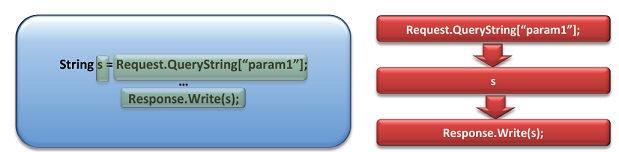
The Basics: Data Flow

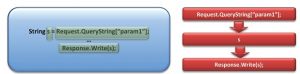
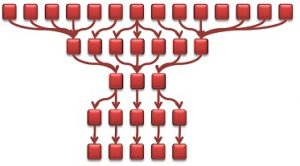
A data flow is best described as a visualization of the code’s path from the source of the vulnerability until the point where it can be exploited (aka “sink”). As you can see, each step in the flow is reflected as a node in the graph:


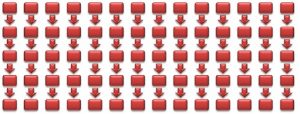
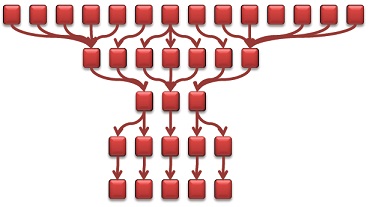
Traditionally, each vulnerability result has a single data flow – independent from other findings. Accordingly, for numerous results, say 14 different vulnerability findings, we can view a graph with 14 separate flows:


Obviously, such a graph does not help much in understanding how to prioritize fixes. What developers really need is to understand the relationships between the different flows and simplify the resulting graph as much as possible.


(Read more:  Annual Survey on Security Budget Analysis Across Industry Verticals)


Improving Visibility: The Graph View

The graph view takes those separate data flows and depicts them in a way that easily presents the relationships between flows.
Building the graph is a two-step process:

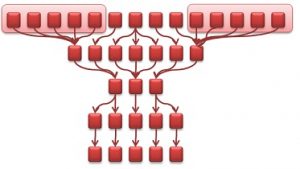
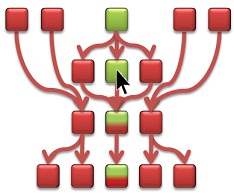
1.Combine the same node appearing in multiple paths. In other words, identify and merge those pieces of code that are actually shared by the same data flows. Taking the 14-path graph from above, consider the case where the 5 leftmost sources share the same node. In turn, this node shares with another node on its level a node closer to the sink:


2. Simplify the graph to reduce the number of data flow levels. This can be done by combining similar-looking data flows to a single node. For those familiar with graph theory, you might recognise by now that we’re building the “homeograph” of the original graph, i.e., a graph with an identical structure but with a simplified representation.We do this by first grouping the nodes:


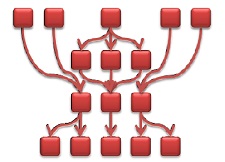
As we continue this process the resulting graph eventually looks like this:


With this simplified graph flow we now have a visual mapping of the security of the code. Moving away from just looking at code bits and at seemingly disparate code flaws, the graph flow actually allows us to see the correlation between vulnerabilities. Furthermore, a quick glance at the graph provides us with a deep understanding of the effect that a certain vulnerability has over the rest of the code – a relationship that’s much too intricate to understand through a code review.


The Butterfly Effect: Considering Fixing Scenarios

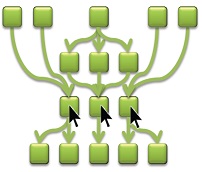
What if you fix the code in a certain location? How will that affect the code? How about in another location? With the graph view in hand, we can consider all these scenarios, see the overall effect quickly, and decide for ourselves which route to take.
Let’s look again at our simplified view (aka “homeograph”) of our original example. A fix of the single node pointed to by the arrow results in fixing two separate paths.


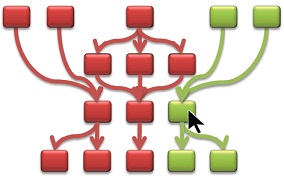
On the other hand, the following graph shows what happens if we try to fix a different node. In this case, the node pointed to by the arrow only leads to a partial fixing of the path. The reason is that the bottom “branch” of that code is also affected by other nodes that are not yet fixed.


We can continue to interact with the graph and consider different “what-if” scenarios. Not only will they show us the ripple effect of fixing a certain vulnerability, but after a certain time of getting into such a habit- we’ll unconsciously understand the impact of certain vulnerabilities and invariably start to recognize our own “best places” to fix.


Only the Best: Optimizing Vulnerability Fixing

Ideally, we’d also like to accurately and automatically pinpoint those “best-fix” locations on the graph.


Once again, this calls for the adoption of graph-theory concepts. In particular, the “Max-Flow Min-Cut” theorem helps us to calculate the smallest amount of node updates that fix the highest number of flows. Applying this calculation to our example graph, we can visually locate those 3 nodes that if fixed -amass to rectifying the complete flow graph.

This is incredible considering that we started with a 14-path graph equivalent to 70 nodes.


(Read more: Security Technology Implementation Report- Annual CISO Survey)


Summary

Graph flows are a visually appealing way for developers and security professionals alike to fully comprehend the relationships between the different parts in the code and the propagation of a tainted piece of code to its sink.
The visualization of the code provides an interactive tool allowing the developer to proactively consider the effect of fixing various vulnerabilities at different places. Most importantly, the graph flow allows us to locate the best-fix locations in a quick, efficient and accurate manner.

Disclaimer: This report is from Checkmarx and if you want more details or want to connect you can write to contact@cisoplatform.com

Read more…

Top 10 Mistakes in Cyber Security Buying

Acquisition of new security tools are not an easy task to handle. Some procurement activities are tedious and requires months of effort to select the right tool that meets all your expectations. In this blog, we are going to list out top 10 mistakes in cyber security buying to avoid while procuring new security tools. Let’s get to it.


The value is not communicated to all the stakeholders (from boards to employees) 

It so happens that CISO’s often find hard to articulate the value that the security control will bring to the organisation. Be it Board or a specific department or a group of employees, they must understand the value of security and the reason for using any such control.


In-depth use cases are not clearly defined:

Identify the most important use-cases specific to your organisation before you buy any security tool. It helps you create custom rule-sets and policies which in turn will help you get the most out of your tool.


Holistic search of vendors and product comparisons not done

There may be many vendors with either same or similar offerings. Some vendor’s capabilities may be comprehensive others it may be very basic. Pricing and licensing models may also vary greatly from vendors to vendors. Security managers need to evaluate and do product comparisons with as many vendors as they can before zeroing on any single vendor.


Read more:( Top 50 Emerging Vendors to look out for in 2017)


Enough Peer reviews & user feedback not collected

Most security mangers may not know about this but peer review and ratings of security products are available online and can be leveraged to learn from other people’s experience. Check for Peer review before you select on any vendors or their products. Peer reviews can tell you about vendors after sale support, Product Bottlenecks, implementation challenges and so on.

READ MORE >>  Cyber Security Maturity Report of Indian Industry (2017)

Tool’s compatibility with existing technology and process stack is not tested

Check whether the tool is compatible with your organisation existing processes. It should support and enhance the existing processes and not be in conflict with any. If its conflicting define exceptions and document them properly. Request vendors for feature customization.


Vendor’s local Support, self or through partners are not considered

Check their support services because human factor is important. It’s not always about the product after sale services matter. Check if the local support is available to you from vendor side or through their partners.


Vendor’s background check and ability to execute is not verified

Do your due diligence before finalising on any vendor. Ask for case studies, take Proof of concept and ask for their competitors.


Vendor’s risk due diligence is not conducted properly

Organization’s also often ignore to check the vendors risk profile and 3rd party risks. You need a robust vendor risk management program before security buying. Please verify from open source intelligence whether there are any major vulnerabilities in their products, patching cadence, past security history, strength of their internal security program, benchmarking against their competition etc.


The Governance policy for that security program is not designed and documented

Any security program to be successful needs proper governance framework & policies. Create policy document specific to each security program.


What do you think could be other points?

Please suggest your ideas in the comments. We would love to hear your opinion.

Read more…

Top 10 Metrics for your Vulnerability Management Program

Security Metrics are essential for quantitative measurement of any security program. Below, we’ve listed some security metrics (in no particular order) which can be used to measure the performance of your Vulnerability Management (VM) program. For demonstrating performance improvements, you can create dashboards / graphs which can show trends over time for some of these metrics. Consider  using Vulnerability Management Platforms or GRC Solutions to help automate collection and reporting of some of these metrics.


  1. Mean Time to Detect

    Measures how long it takes before known vulnerabilities get detected, across the organization. If a Heartbleed 2 or EternalBlue 2 were discovered today, how long will it take to identify all the impacted systems across the organization?

  2. Mean Time to Resolve

    The mean time interval taken to remediate / patch vulnerabilities after identification by the Vulnerability Assessment (VA) tool. (i.e. post detection)

  3. Average Window of Exposure

    The time when a vulnerability was first publicly known to the time the impacted systems gets patched.

  4. Scanner Coverage

    This measures the ratio of known assets (e.g.: from Asset Management solution) to those which actually get scanned. Can be split by Internal Assets & External assets.

  5. Scan Frequency by Asset Group

    How frequently are the assets scanned based on different groupings (e.g.: Internal Assets, BU Assets, Impacting Compliance like PCI etc.)

    ( Do More : Check out the top technologies in Vulnerability Assessment Domain )

  6. Number of Open Critical / High Vulnerabilities

    Based on Risk based Prioritization of vulnerability, considering a number of factors (e.g.: CVSS, Asset Criticality, Exploit Availability, Asset Accessibility (Internet vs Intranet), Asset Owner etc.)

  7. Average Risk by BU / Asset Group etc.

    Based on Risk based Prioritization of vulnerabilities (outlined above), the average risk exposure can be calculated based on different groupings.

  8. Number of Exceptions Granted

    This metrics tracks the vulnerabilities which have not been remediated because of various reasons. You may set rules in your scanner to overlook such vulnerabilities but you have to track them for auditing and/or future actions as they may still impact your risk posture.

  9. Vulnerability Reopen Rate

    This measures the effectiveness of the remediation process. A high rate means that the patching process is flawed

  10. % of Systems with no open High / Critical Vulnerability

    What % of systems are fully patched and have no high severity vulnerability present. Can be reported by asset groups.

Do let me know if you want us to add or modify any of the listed metrics. Check out the Vulnerability Assessment market within Product Comparison Platform to get more information on these markets.

Read more…

CISO Viewpoint: Safe Penetration Testing

Safe Penetration Testing – 3 Myths and the Facts behind them

Penetration testing vendors will often make promises and assurances that they can test your Web Applications safely and comprehensively in your production environment. So when performing Penetration Testing of a Web Application that is hosted in a Production Environment you need to consider the following myths and facts which can directly or indirectly end up causing you to do to yourself what you are trying to prevent hackers from doing to you in the first place.


(Read more:  Under the hood of Top 4 BYOD Security Technologies: Pros & Cons)


Myth 1 – Vendors promise that testing on your production environment is perfectly safe and that penetration testing will not cause any disruption to your end users.


The Facts

  • During testing, the application or its host may suffer degradation in performance if it is not designed, configured and implemented adequately. This will result in end users of the application suffering a diminished user experience or even a Denial of Service situation under the wrong circumstances. This is quite often out of the hands of the testing vendor and can be neither predicted nor fully avoided if any decent level of penetration testing is to be done.
  • Safe testing is usually limited to reducing the number of threads and requests made by any scanners used and will make testing take much longer than usually quoted by your testing vendor. Another way vendors claim to do safe testing is by disabling automated form fills by the scanner which results in substantially lower test coverage.
  • During our testing, we have encountered quite a few cases where the target application suffered performance issues due to bad design even though automated form fill was disabled and the scan was limited to only one thread with request throttling. In one case, we found that the application was performing detailed logging which was disk intensive. The application was normally very sparsely used, but during testing, the logs quickly filled up and caused a Denial of Service.


(Read more: CISO Mantra on data sanitization)


Myth 2
 – Your penetration testing vendor may tell you that your data is safe for full blown penetration testing on a production system.


The Facts

  • SQL injection, Cross Site Scripting (XSS) and Cross Site Request Forgery (CSRF) in some cases can only be confirmed by actually attempting to insert data into the Web Applications underlying database particularly where any forms are present on the URL where the test case is crafted to either perform a create or update function.
  • Also, any application function that is designed to perform any data insertion,      updating or deletion from the database within the confines of the expected design may be executed during testing for exploits resulting in data corruption which may be undesirable. Again safe testing will mean that a      lot of test cases won’t be performed and hence vulnerabilities will be missed.

(Read more:  BYOD Security: From Defining the Requirements to Choosing a Vendor)


Myth 3
 – There will be no disruption to your business during penetration testing.


The Facts

  • If the target application to be scanned is linked to other servers and applications that are part of a business process chain, then they are likely to be affected. The effects could range from flooding the system with dummy emails, orders, info request forms etc. which can all potentially disrupt the business if not handled carefully.
  • In one case, the target application was generating multiple synchronous back end requests for each request sent to it. This led to an amplification of requests which quickly overloaded the servers and led to a Denial of      Service.  Safe testing may be done by disabling form filling which will severely limit the coverage of the testing performed.


(Watch more : Top Myths of IPV-6 Security)


Advantages of Performing Pen Testing on a Staging Environment

What seems obvious from all the above is that wherever possible you should try to perform penetration testing on a staging or testing deployment. This has two main advantages;

  • First,  you don’t impact your business directly in any way.
  • Second and more importantly you do not put constraints on your Penetration Testing vendor that would not apply to a hacker. Once your testing regime is mature and you have fixed all the vulnerabilities on the staging environment you can consider doing a full Penetration Testing on your Production Environment as a final assurance check.


Adapted from the original blog written on Iviz Security website.

Read more…

9 Key Security Metrics for Monitoring Cloud Risks

Most organizations are using multiple cloud applications daily (by some estimates 100+). These applications need to be closely monitored based on the risk they pose and the purpose they serve. Here are some key security metrics which can help you monitor the use of Cloud Applications (primarily SaaS) within your organization. You can automate the measurement and report for most of these metrics using solutions like Cloud Access Security Brokers (CASB).


1- High-Risk Cloud Apps Discovered
Number of High-Risk Cloud Apps Detected based on Risk classification parameters for apps (e.g.: Apps without a well-defined privacy policy, hosting data outside EU etc.)


2- Cloud Apps Unauthorized / Authorized :
The ratio of Unauthorized vs authorised Cloud-Apps in use. Often Business Units can purchase Cloud Services on their own without informing IT, which results in Shadow IT. Some of these apps might not be authorized due to security concerns.


3- of Redundant Cloud Apps:
The number of duplicate / redundant cloud apps based on app discovery and use case. This can also help demonstrate cost savings providing a metric business can directly relate to. E.g.: Cloud-based File Storage can be consolidation to 1 provider from current 4 (Google Drive, SkyDrive, Box and Dropbox).


4- Sensitive Data Exposures Detected
Files accessible by unauthorized users either via the internet or intranet


5- Number of External Collaborators
Count of people from outside the organization who’re working collaborating on files containing sensitive data, hosted within or outside your domain


6- Cloud Services Having Access to Sensitive Data
Number of cloud services which store or process any data which is classified as sensitive by the organization.


7- Number of Cloud Services by Category
Number of cloud services in use by the organization in various categories (e.g.: Social Media, File Sharing, Screen Sharing etc.)


8- Cloud Policy Violations
These can vary based on the cloud policy defined by the organizations, but policy violations & exceptions need to be closely monitored, that’s why we included this metric. Some examples:

  1. # Unmanaged Devices having Access to Sensitive Data on Cloud
  2. # Instances of Sensitive Data on Cloud without Organization Managed Encryption Keys
  3. # Unmanaged cloud applications (e.g.: for Which Logs are not there for tracking user activities/logins)

9- Administrative or Privileged logins / Cloud Service
Average number of users having admin privileges for authorized cloud applications being

Did we miss something? Drop a note and we’ll update the list based on the feedback.

Read more…

This blog will provide the pros and cons of different types of Application Security Testing Technologies, and checklist to chose among them.

Static Application Security Testing (SAST)

SAST or Static Application Security Testing is the process of testing the source code, binary or byte code of an application. In SAST you do not need a running system.


Pros

  • SAST can pin point the code where the flaw is.
  • You can detect vulnerabilities before it is deployed: SAST does not need a running application.
  • Using SAST you can find vulnerabilities in an earlier phase of the Application’s development.


Cons

  • SAST fails to find vulnerabilities located outside the code or in third party interfacing.
  • SAST cannot find out vulnerabilities related to operational deployment.
  • Business Logic vulnerabilities cannot be discovered by a typical SAST automated tool.
  • SAST is more expensive and has higher overhead.
  • You need to provide the source code or binaries for SAST.


(Read more:  CISO Round Table on Effective Implementation of DLP & Data Security)


Dynamic Application Security Testing (DAST)

DAST or Dynamic Application Security Testing is the process of testing an application during its running state. In DAST you do not need the source code or the binaries. It is a method to probe from outside just like a hacker.


Pros

  • Can detect vulnerabilities related to operational deployment.
  • Business Logic Flaws can be figured out by DAST if you are using Hybrid Testing (with manual augmentation).
  • Does not need access to the code.
  • Easier to adopt, lower in cost and is more mature in terms of industry adoption.
  • Can find vulnerabilities located outside the code or in third party interfacing.


Cons

  • Cannot pin point the exact location of vulnerability in the code.
  • Coding quality or adherence to coding guidelines cannot be understood easily.


(Read more:  Can your SMART TV get hacked?)


DAST vs SAST: What should I choose?


1 Step: Conduct DAST.

This is low hanging fruit, Easy to adopt, Less Expensive, More mature.

Exception: Choose SAST if your application needs to be installed and is not web-based (e.g. client based apps like Chat Client, VOIP Client etc)


2 Step: Conduct SAST+DAST

Lower false negative, better coverage, more costly, higher overhead


Adapted from the original blog written on Iviz Security website.

Read more…

Secure SDLC Program: “The Art of Starting Small”

I have seen several organizations trying to adopt secure SDLC and failing badly towards the beginning. One of the biggest reason is they try to use “Big Bang Approach”. Yeah, there are several consultants who will push you to go for a big project use the classical waterfall model to adopt secure SDLC. But that’s asking too much. Changing the habits of a group is not very easy.


Typically there is a big push back and depending on how determined you are and the amount of dedicated resource you have either the exercise will be a half hearted success or a failure.  However, with less effort than that you can be more successful. Here is how.


( Read More: 5 Major Types Of Hardware Attacks You Need To Know )


Why starting small is important?

  1. Changing group habit is very tough. Remember the last time you or your friend wanted to change the habit of smoking?
  2. Defining the optimal (minimal but effective) process is tougher than you think
  3. What you think will work might actually not
  4. Every organization is different. You will have your own learning.
  5. Secure SDLC is not just technology. You will have to deal with human minds, habits and resistance


Phase 1:  Art of starting small

Define only one small area (in terms of secure coding) or a small group and implement the most important coding guidelines you want to implement. Keep the number of stuff minimal so that you get the least pushback in adoption and start building the desirable habit/mindset among the users. During this phase make sure you have the following:

  1. Define the most important goals. It should not be more than 1 or 2. Changing habits of a group is not easy. Hence keeping it small makes it easier. Once your pilot is successful you will have enough learning to do the complete roll out. Select the top 20% of guidelines which will help you the most in phase 1.
  2. Define the measures of success. It is very important to measure the success of adoption. Implementation just for sake of implementation will produce all most similar amount of junk code.
  3. Do weekly huddles. Measure the weekly adoption and success metrics. Check out the target vs achievement, road block, solutions and next week plan.
  4. Create a Secure SDLC learning document. Create a document of what you learnt from the process and define the model which worked. This should be the document which shall be the guide for you to launch the bigger mission across the organization and across all areas of coding.


( Read More: 5 Reasons Why You Should Consider Evaluating Security Information & Event Management (SIEM) Solution )


Phase 2: Big Bang Implementation

Now that you have done a small implementation and have gone through the learning, you will better equipped to implement for the larger organization or for the larger domain. I am not discussing the details of this phase here since I wanted to focus on the “Lean model” of “Starting Small”.


This is a re-post of the blog originally published on CISO Platform

Link to original blog: http://www.cisoplatform.com/profiles/blogs/secure-sdlc-implementation-art-of-starting-small


Read more…

SAST vs. DAST: How should you choose ?

This blog will provide information about SAST or Static Application Security Testing and DAST or Dynamic Application Security Testing. And also answer the common question of SAST vs DAST.

What is SAST?

SAST or Static Application Security Testing is the process of testing the source code, binary or byte code of an application. In SAST you do not need a running system.


What is DAST?

DAST or Dynamic Application Security Testing is the process of testing an application during its running state.  In DAST you do not need the source code or the binaries. It is a method to probe from outside just like a hacker.


SAST: Pros and Cons

Pros
• SAST can pin point the code where the flaw is
• You can detect vulnerabilities before it is deployed: SAST does not need a running application
• Using SAST you can find vulnerabilities in an earlier phase of the Application’s development

Cons
• SAST fails to find vulnerabilities located outside the code or in third party interfacing
• SAST cannot find out vulnerabilities related to operational deployment
• Business Logic vulnerabilities cannot be discovered by a typical SAST automated tool
• SAST is more expensive and has higher overhead
• You need to provide the source code or binaries for SAST


(Read more:   How Should a CISO choose the right Anti-Malware Technology?)


DAST: Pros and Cons

Pros
• DAST can detect vulnerabilities related to operational deployment
• Business Logic Flaws can be figured out by DAST if you are using Hybrid Testing (with manual augmentation)
• Does not need access to code.
• DAST is easier to adopt, lower in cost and is more mature in terms of industry adoption
• DAST can find vulnerabilities located outside the code or in third party interfacing

Cons
• DAST cannot pin point the exact location of vulnerability in the code
• Coding quality or adherence to coding guidelines cannot be understood easily


(Read more: 5 of the most famous and all time favourite white hat hackers!)


A Few SAST myths

• Myth 1: SAST gives better coverage: It is a myth that SAST gives better coverage. SAST cannot find vulnerabilities in Business Logic or in third party code/interfacing.
• Myth 2: SAST has lower false positive: This is not true. All tools throw out a lot of false positives irrespective of SAST or DAST. Human augmentation is the only way to remove all false positives.


When to choose DAST?

• Ideally, DAST should be adopted irrespective of SAST since you want to know the flaws (including Business Logic Flaws, Flaws due to third party code etc) which SAST cannot find. DAST gives you the picture from the perspective of a hacker.
• DAST should be adopted prior to the system going live or during every release(production).
• When you do not have access to code or don’t want to give access to it.


(Watch more : South Asia’s Cyber Security Landscape after the Snowden Revelations)


When to choose SAST?

• SAST is ideal if you want to test the application while it is being built
• You have access to the code/binary and have enough maturity in the organization and the budget to handle it.


Final words

Neither SAST nor DAST is enough. They are complimentary to a certain extent. The future is in the smart integration of SAST and DAST technologies.


This is a re-post of the blog originally published on CISO Platform

Link to original blog: http://www.cisoplatform.com/profiles/blogs/technologies-in-penatration-testing-what-to-choose

Read more…

While the proliferation of the BYOD trend has been bonus for businesses in terms of cost savings to productivity gains. But for IT departments, security and compliance is a headache as they scramble to catch with the mobility requirements of workforce. Here are some of the key metrics which can help your organization to monitor the use of enterprise mobility management.

Unmanaged devices in the enterprise network:

This is the total number of un-managed devices being used in the enterprise. Un-managed devices pose security risk to any organization; hence, this number should be as minimum as possible


Average number of hours an authorized device is found on network:

This is the total duration an unauthorized device appeared which may hide themselves through different approach which can be through personal firewalls or having their service disabled.


Number of OWASP Mobile Top 10 Risks Identified and Fixed:

By evaluating mobile apps for flaws and vulnerabilities in 10 distinct categories, security teams can work on mitigation plan to reduce these flaws in each risk categories.


Risk/Vulnerability Score:

This is risk score which can be derived using factors like number of unauthorized devices, average hours an unauthorized device is found on network and the device threat or unauthorized app is accessed. The reporting should assign a total risk score, summarize discovered vulnerabilities, and provide suggestions on how to resolve threats.


Shadow IT apps used by employees on mobile devices:

This metric identifies the number of unauthorized apps used on employee’s enterprise mobile devices. It should give detailed reporting like determine the most frequently blacklisted or whitelisted apps, view the number of devices and the applications the users have.


Benchmarking:

It should stack your security risk score with the competitor and identify gaps across deployment, devices, and apps. It should also give tips to better organization’s approach to mobile productivity and security.


Read more:(TOP 6 VENDORS IN ENTERPRISE MOBILITY MANAGEMENT (EMM) MARKET AT RSAC 2017)


Policy violations per month:
This is the total number of policy violations per month. This metric indicates the possible false positives/false negatives and help in policy fine-tuning.


Mean time it takes to provision and deprovisioning mobile devices in an enterprise network:
This metric refers to the mean time it takes to provision/deprovisioning any mobile devices in the network. EMM solution with centralized management and control this time should be usually in minutes.


Do let me know if you want us to add or modify any of the listed metrics. Check out the Enterprise Mobility Management market within Product Comparison Platform to get more information on these markets.

Read more…

Key Metrics for your IT GRC Program

IT GRC is a very broad topic encompassing nearly all aspects of information security. In this blog, we’ve tried to list down some key metrics that you should be tracking as part of your IT GRC program. Like all metrics these can be tracked on a periodic basis (monthly, quarterly etc.) and represented using a trending graph. Solutions like IT GRC Platforms can help automate the collection and reporting of metrics.


Maturity Score

This will be based on the frameworks the organization is following, like NIST Cybersecurity Framework (CSF), COBIT etc. Demonstrating progress based on maturity levels should be a key requirement for your IT GRC program.

Policy Related Metrics

These metrics provide insights into the effectiveness of your policies and can include metrics like:

  1. # Policy Exceptions and/or violations
  2. Avg Duration of Policy Exceptions
  3. # of Redundant Controls

Risk Metrics

This is very broad topic and should be based on organizational context. Organizations can also look at frameworks like FAIR for adopting a quantitative approach to cyber risk management. Here are some generic metrics organizations can consider:

  1. Risk Assessment Frequency
  2. Risk Tolerance or Risk Appetite (in $ value if possible)
  3. Residual Risk / Risk Tolerance Level
  4. # of Open Critical / High findings (via Risk Assessment)
  5. Average Time to Remediate Risk


Audit & Compliance

Audit related issues grab attention quickly. These are some of the metrics which can help track your audit program (monthly / quarterly / annual).

  1. # Critical or High Audit Findings
  2. Audit Exceptions Index (this can be calculated by : Audit Exceptions / Audit Findings)
  3. # Control Test Failures (by Criticality)

Read more:(TOP 6 VENDORS IN IT GOVERNANCE, RISK AND COMPLIANCE (IT GRC) MARKET AT RSAC 2017)
 

Incidents Metrics

Here’s a short list of key metrics which you can consider to monitor your incident management program:

  1. Incident Cost or Loss (brand impact)
  2. Critical or High Incidents Frequency
  3. Number of Incidents by Category (e.g.: Malware, Data Loss, Downtime etc.)

This is a short list of metrics, help us expand the list by listing your favorite metrics in the comments section.

Read more…